
Mix06 live (12): Playing with IE7, Office 2007 and Vista
At Mix06 (no, it's no longer 'live'), I had the opportunity to play with Office 12 (to be launched as "Office 2007" later this year) and with the latest beta version of Internet Explorer 7. Unfortunately, LVB.net looked horrible in Microsoft's new browser. The white background was not aligned with the header and the article text. My first reaction was "oh well, in the past we had to test each site in Firefox and in IE6, now we will have to test it in Firefox, IE6 and IE7". But after my lunch with the Belgian Microsoft people, they forwarded me to Bob, an IE7 developer from Microsoft who was in the Mix06 sandbox room. He checked my blog, and discovered that the problem was caused by a "background-position-x: 50%" in the CSS code, which made the background image align to the center of the screen. However, there was no such "50%" string in my CSS. After reading the W3C specification for CSS, Bob discovered that when a background image is aligned to "top" without specifying a horizontal position, a centered position is assumed. This was the explanation for the 50% that appeared without being in my CSS code. But, as Bob told me, the positioning of my background was still a bug in the IE7 CSS handling code, some part that he had coded himself. He suggested I bypass this bug for now by changing
#page { background: url("...") repeat-y top; }
into
#page { background: url("...") repeat-y top left; }
And yes, after making the modification, my blog looked OK in IE7. I received a long sleeve T-shirt with the "seven" logo for discovering this bug.



In Office 2007, the menus have been restructured. You will not find the familiar "File, Edit, View, Tools, Window, Help" menus, but a more task-oriented menu structure. But, as one Microsoft representative told me, "it will always be possible to switch back to the old menu structure if you want to".
In Windows Vista, when you use the Windows Explorer to browse the files on your computer, you will not find the familiar "up one level" button. You will see a breadcrumb path, similar to what a lot of websites and blogs are showing on their pages, e.g. Main > News > Finance. The breadcrumb lets you go up several levels with one click, so it is clearly an advantage to the old mechanism.
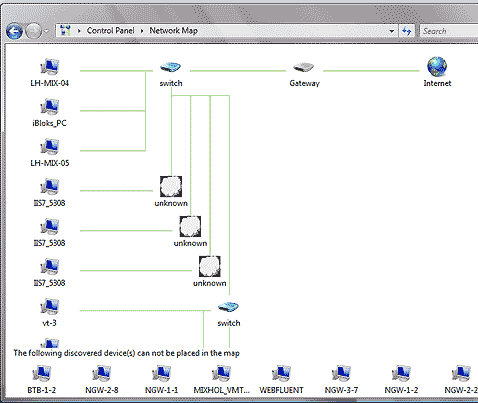
When opening the Control Panel in Windows Vista, I discovered the "network map" feature which I really liked. It automatically discovers the network topology of your network. Here's a screenshot:


RSS feeds
 Artikels
Populaire inhoud
Van vandaag:
- Bij de "politieke" kersttoespraak van de koning
- Privacyverklaring
- Nomocratie, teleocratie, particratie en de vrije meningsuiting
- Heisa rond een illegale metalen kerstboom
- Vette blunder in De Morgen, dikke pluim voor HLN
- Zatte vrienden doen peiling van La Dernière Heure mislukken
- 10 lessen uit 10 jaar bloggen
- CD&V ten oorlog tegen palmolie en kokosvet
- De Hoge Gezondheidsraad over palmolie
- Ken uzelve
Van altijd:
- Originele nieuwjaarswensen
- De beste foto's uit de shame-betoging
- Evolutieleer voor beginners
- Zomertijd, wintertijd en astronomische tijd
- Amerikaanse bedrijven vormen geen bedreiging voor een open internet
- 10 nieuwe uitvindingen die de wereld gaan veranderen
- Dubbele regenboog
- De TAC-test
- Werkloosheid wenkt voor belspeldellen
- Luchtfoto's van drie provincies online beschikbaar
Reacties
krizla
woensdag, 31 mei, 2006 - 14:37nevermind microsoft man ... get firefox :)
VHfc
dinsdag, 18 april, 2006 - 00:29Stumbled on this item just now.
About CSS positioning, that's really a pain in the neck as to cross-browser compatibility. I also check on Opera and Netscape but I recently dropped Opera since it turned out looking at my logs that’s I was the only one using it. I'm not so sure about Netscape, although it has come down a lot since Firefox.
When you start to play with the DOM model, then the differences in rendering between Mozilla and IE become cumbersome, the document.layer stuff and the absolute divs.
About Longhorn/Vista, I was very excited about the smart folders thingie. Then end last year I read the Newsweek issue where they told MS would leave that out for now. It's cool to have gadgets like glass-buttons in the GUI, but smart folders is exactly what we need. I think Mac has it already with Spotlight.
So did you catch any gossip at all about smart folders? I saw a sneaky presentation on Youtube and they were mentioned in it. There are some third-party smart folders products available, based on a database implementation, but they just can't handle the sheer volume on photos I have. It should be built in on the level of the file system of course.
Ivo
donderdag, 30 maart, 2006 - 07:14... So the conclusion remains: "in the past we had to test each site in Firefox and in IE6, now we will have to test it in Firefox, IE6 and IE7" (nevermind smartphones)